
Quick Answer
Survey questions are either objective (factually verifiable, like attendance counts) or subjective (opinion-based, like satisfaction ratings); a KnowledgeSmart Survey can be appended to a Skills assessment or Skills audit, or sent independently, and generally gives you more useful, centralized data than an external survey tool.
What This Article Helps With
This article explains the value of different survey question types, how a KnowledgeSmart Survey can be appended to a Skills assessment or Skills audit, and offers example questions for post-training and post-assessment Surveys. It applies to KnowledgeSmart Administrators, Content Managers and Learning Managers.
Objective vs. Subjective Questions
Objective questions are factual, and their answers can in theory be independently verified - for example, "Over the past year, roughly how many training sessions have you attended?" The answer doesn't need to be precise, but it should be factually accurate.
Subjective questions are based on what the survey-taker thinks or feels - for example, "Did the training meet your expectations?" Even framed as single or multiple-choice, the answer reflects opinion rather than a verifiable fact.
Writing Effective Survey Questions
- Be concise. State questions as simply and briefly as possible.
- Write in a conversational tone. Phrase questions the way you'd ask them in conversation.
- Consider the mandatory setting carefully. A KnowledgeSmart Survey question can be made mandatory, so a user can't skip to the next question without answering. Making most questions optional tends to reduce the chance of respondents quitting the Survey or answering at random.
- Test your Survey first. Try your questions on a colleague or focus group before sending them out, to catch problem areas.
- Favor closed-ended questions if you want data that's easy to view, interpret or analyze.
Where to Run Your Survey
The KnowledgeSmart general Survey platform can be used to append Survey questions to a test, or to send an independent Survey gathering subjective feedback from your employees.
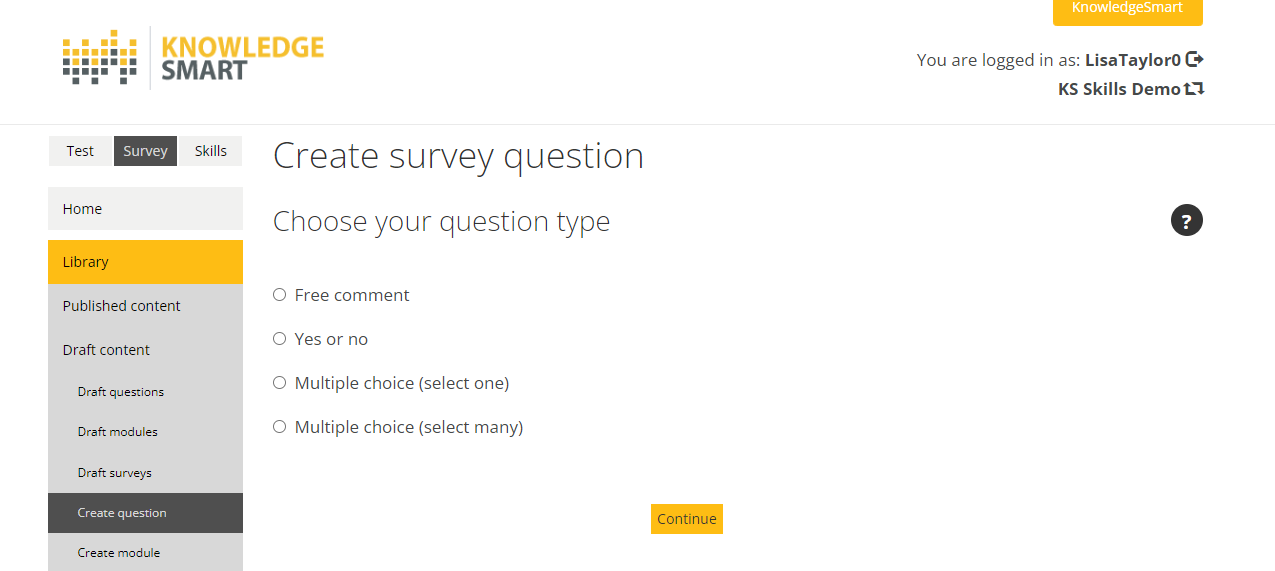
You can also use an external survey tool, such as SurveyMonkey or Microsoft Forms, if sending a survey link independently of a KnowledgeSmart test. There's real value in centralizing your skills data where possible, by using the KnowledgeSmart general Survey tool instead: it keeps all your data in one structure, lets you cross-reference Survey insights against other skills data, and makes it easier to manage who can send Surveys, see data, or see specific insights.
Why Use a Survey?
As part of a training program:
- Before the course - find out what participants hope to learn, and how they rate the pre-course process.
- During the course - get an evaluation of course design, including content, structure and delivery.
- After the course - receive feedback on the course overall, learner satisfaction, and your follow-up process.
As part of an assessment plan:
- Before the test - pulse-check sentiment about taking the test, and how they rate the pre-assessment process.
- After the assessment - get an evaluation of test design, including content, structure, delivery, timing and difficulty.
Survey Question Types
- Single-choice and multiple-choice questions (Multiple Choice – Single, Multiple Choice – Multiple)
- Likert scale / rating questions (Rating, Multiple Choice) - a general Survey can be appended to a Skills audit, and you can define the rating scale on a per-audit basis. If you plan to use a lot of rating questions, a Skills audit with Survey questions appended may be a better fit than a standalone Survey.
- Closed-ended questions (Yes/No, True/False)
- Open-ended questions (Text, Free Comment)
A general Survey can be appended to a KnowledgeSmart Skills assessment, or delivered independently. When appended, the user is prompted to answer the Survey questions as soon as they've submitted their assessment for marking - while the experience is still fresh, which tends to produce more accurate and reliable feedback.
Example Questions
A representative sample from each category is below - adapt the wording and answer options to your own content.
Closed-Ended Post-Assessment
- Do you use [software name] in your current role? (Yes/No)
- Do you think a refresher course would be helpful? (Yes/No)
- Would you prefer more frequent assessments? (Yes/No)
Multiple-Choice Post-Assessment
- How frequently do you use [software]? (Daily; 2–3 Times/Week; Weekly; Bi-Weekly; Monthly; A few times per year; Never) — single choice
- How useful was the training in enhancing your awareness/knowledge? (scale of 1–5, 1 being very poor and 5 being excellent)
- Which of the following assessment sections were most challenging for you? (select all that apply) - multiple choice
- Please give us your feedback regarding the difficulty level of the assessment questions. (Too Easy; Right Difficulty Level; Too Challenging) - single choice
Free Comment / Open-Ended Post-Assessment
- What year did you last receive formal training on [topic]? (Free comment - year)
- Were there any factors you feel impacted your assessment result that you want to make us aware of? (If nothing, just skip the question.)
Single-Choice and Multiple-Choice (Training)
- "Which characteristic should employee goals NOT have?" - A. Challenging B. Specific C. Attainable D. Realistic E. Don't know
- "Employees should be guided to pick goals that have which of the following characteristics?" (choose all that apply) - A. Specific B. Attainable C. Measurable D. Realistic E. Time-Based
Likert Scale
Likert scale questions ask respondents to assign a number, usually out of 5, to each item - a popular alternative to single or multiple-choice.
- How engaging was the course? (1–5 scale)
- "How would you rate the pace of learning on the course?" (Slow, Medium, Fast, Don't know)
- "Please rate your overall experience on the course" (Likert 5-scale)
- "How engaging was the course instructor?" (Rating question, out of 5 stars)
Closed-Ended (Training)
- Did you complete the course? (Yes/No)
- "Was the content clearly presented?" (Yes/No)
- Was the platform easy to get familiar with? (Yes/No)
Open-Ended (Training)
- Did the course meet your expectations? Why? Why not?
- What additional learning modules would you like to see included in the course?
- "Did you experience any technical issues? If so, please explain." (provide space for an answer)
- Do you feel competent and confident at the end of the training program? Please share any concerns or knowledge gaps.
Pre-Training
- How easy was it to enroll in the course?
- Were the learning goals clearly stated before the start of the course?
- How would you rate the course onboarding process?
Environment and Technical
- Were there any external distractions while taking the course?
- Did you experience any problems with the course log-in?
- Did the video content load on your device?
Learning Experience
- Do you feel that your knowledge or skills have improved by taking the course?
- How would you rate your overall learning experience?
- How could we improve the learning experience?
Helpful Tips
- See How to customize a KnowledgeSmart Survey for building the questions covered here.
- Perhaps the most important part of running a Survey is analyzing the responses and developing an action plan that shows responsiveness and drives continuous improvement.
Common Questions
Should my Survey questions be mandatory or optional?
Mostly optional. Forcing respondents to answer every question tends to make them more likely to quit the Survey or answer at random - reserve mandatory for the questions you genuinely need answered.
Should I append my Survey to a Skills assessment or Skills audit, or send it independently?
Appending it means the user answers right after submital, while the experience is still fresh - generally more accurate and reliable than a Survey sent separately later.